
The State News: South Carolina
McClatchyNews & Magazines
3.298.00 Reviews
- Version
- 11.1.16
- Installs
- 10.00K
- Age Rating
- Everyone 10+
Screenshots

Our Review of The State News: South Carolina
 Analysis by Appyee
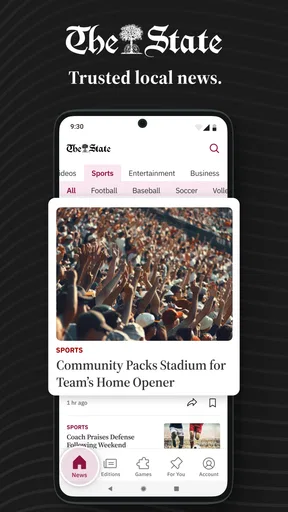
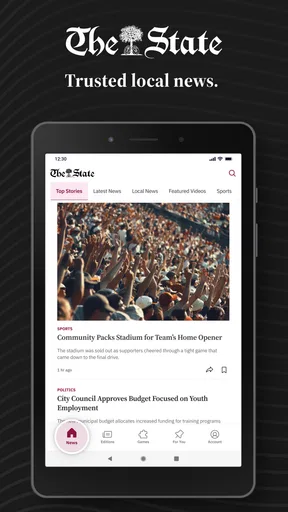
I found The State News: South Carolina most useful when I treated it as a local news companion rather than a complete replacement for every source I already use. Developed by McClatchy, this free News & Magazines app focuses on Columbia and the wider South Carolina area, bringing together reporting about breaking events, politics, business, weather, and sports. That local emphasis gives it a clear purpose: it helps me stay oriented to what is happening nearby instead of sorting through a national feed where regional stories can disappear.
My first impression was practical rather than flashy. The app is aimed at people who want a direct route to South Carolina coverage, especially readers who follow Columbia closely or need a broader statewide view during a developing story. It is available for users aged Everyone 10+, runs on Android 8.0 and later, and is currently listed as version 11.1.16. Those details matter in a shared household because an older phone may still be suitable, while a much older Android installation may need attention before anyone relies on it for daily news.
How it works in a shared household
A realistic use case is a household where one person checks local headlines before work, another follows state politics, and someone else mainly wants weather or sports. In that situation, the app can serve as a common starting point without requiring everyone to search separately for Columbia-related stories. I can imagine opening it during breakfast to check for overnight developments, then handing the phone to another family member who wants to scan the sports section or look for a weather update.
The important distinction is that shared access to the same app does not necessarily mean shared preferences, reading history, or subscription access. I would not treat one installation as a substitute for separate account boundaries. If several people use the same device, I would keep expectations clear about who is signed in, who may encounter a purchase prompt, and whose reading choices might affect the experience. That is especially relevant here because the app is free to install but includes in-app purchases ranging from $7.99 to $159.99 per item.
For a family tablet in a kitchen or living room, I would use the app as a communal headline screen, not as a private journal of individual interests. One person can check the latest local story, while another can open a different section afterward. The arrangement works best when everyone understands that the device is shared and that the app should not be assumed to separate each reader automatically.
The strongest household use is coordinated awareness, not personalized isolation. If the goal is simply to know what is happening around Columbia, a shared device can make the app convenient. If each person expects a completely independent news space, separate devices or clearly separated accounts may be a better arrangement.
Setting expectations before daily use
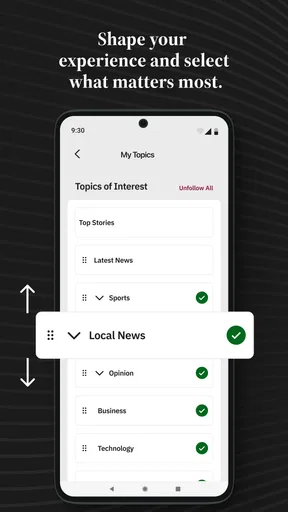
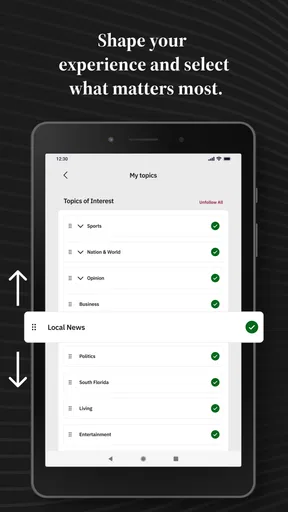
The first setup decision is deciding what “local” means for your household. Someone living in Columbia may want frequent attention to city and regional developments, while a reader elsewhere in South Carolina may care more about statewide politics, business, sports, or weather. I would encourage each person to identify the sections they genuinely intend to check instead of opening the app without a routine. That small habit prevents the broad coverage from becoming an endless scroll.
I also recommend agreeing on a simple rule for urgent stories. A headline in a news app is a starting point, not automatically the whole explanation. When a story affects travel, school plans, work, or personal safety, I would open the article, check its context, and compare it with official local information when appropriate. This is not a criticism unique to this app; it is a sensible boundary for any breaking-news service.
On a shared phone, I would also avoid assuming that every reader wants the same level of interruption. A person who checks headlines once in the morning may find frequent attention-seeking behavior distracting, while another reader may want to check developments throughout the day. Since I would rather not invent a particular notification workflow that may vary by device or release, my practical advice is to review the app’s available notification choices during setup and decide together what is useful.
There is another boundary around purchases. Because the app has paid items despite being free to download, I would make sure children or casual users know not to confirm a purchase without permission. This is particularly important on a family device where the person holding the phone may not be the person responsible for billing. A clear household agreement is more reliable than assuming that everyone understands the difference between opening an article and entering a paid area.
Coordinating local information without duplicating effort
The app becomes more valuable when household members divide attention intelligently. One person might use it for the morning overview, another might follow political developments, and a sports fan might check results later. That is more efficient than everyone repeatedly refreshing the same front page. I like this approach because it turns a local news app into a shared reference point while leaving room for each reader’s priorities.
A useful workflow is to begin with the broadest view, then move into one subject that affects the day. For example, I might scan the main local stories first, open a weather-related article if conditions could change plans, and then leave the app. A commuter could use the same routine before leaving home, while a parent might check local developments before coordinating school or evening activities. The strength is not just having several topics in one place; it is reducing the time spent jumping among unrelated sources.
Another practical tip is to discuss article context rather than merely forwarding headlines. If one household member sees a political story and another sees a business development, talking about the full articles can help everyone understand what is relevant without turning the app into a stream of isolated alerts. I would especially avoid presenting a headline as a final conclusion when the subject is controversial or still developing.
For sports fans, the app can be a convenient part of a wider routine, but I would not expect it to replace a dedicated live-score or team-specific service for every need. The same trade-off applies to weather. The State News: South Carolina can help me find regional coverage, yet someone needing minute-by-minute conditions or specialized alerts may prefer a dedicated weather tool as a companion. The app’s advantage is the combination of local reporting categories, not necessarily deep specialization in each one.
Account boundaries and the cost of convenience
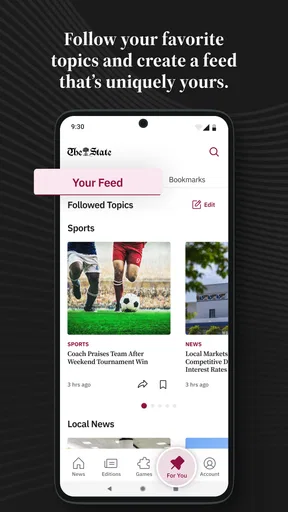
Shared-device use raises a question that is easy to overlook: whose experience is being optimized? If one person frequently reads politics while another mainly wants sports, a single app session may feel convenient for one and cluttered for the other. I would solve that socially, by agreeing on a routine and avoiding the assumption that the app will understand every person’s preferences separately.
The same caution applies to paid access. The free entry point makes it easy for a household to try the service, but the listed in-app purchase range means the person managing the device should know where payment decisions could arise. I would not hand the device to a child and assume that age suitability eliminates all financial concerns. The Everyone 10+ content rating describes the intended age context, but it is not a substitute for a parent deciding what a particular child should read or purchase.
For adults sharing a phone, the issue is less about supervision and more about privacy and clarity. A reader may not want another person to infer their interests from recently opened stories, while another may not care at all. If that distinction matters, I would use separate devices or clear account practices rather than relying on a communal setup. The app is easier to recommend for shared awareness than for confidential, individualized reading.
There is also a useful trade-off between simplicity and breadth. Keeping Columbia and statewide coverage together is convenient, but a reader who wants only one narrow topic may find the wider mix unnecessary. I would keep the app if local context matters across several parts of life; I would look elsewhere if I wanted a highly specialized feed with no general news around it.
Age context, trust, and responsible reading
The Everyone 10+ rating makes the app broadly approachable for older children and adults, but I would still guide younger readers through the difference between news reporting, commentary, advertising, and a developing account of an event. Local news can involve serious subjects, political disagreement, accidents, or community concerns. A child may be able to open the app technically while still needing an adult to explain what a story means.
That makes the app suitable for a household conversation about trust. I would encourage younger readers to ask where a claim comes from, whether an article is reporting a confirmed event or describing an ongoing situation, and whether another source should be checked before acting. Those habits are more valuable than simply telling someone which headlines to believe.
For adults, the same principle applies in a different way. Local coverage can be highly relevant because it affects nearby decisions, but relevance can also make a story feel more personal. I try to separate the usefulness of timely reporting from my first emotional reaction to a headline. Opening the article, noticing the subject area, and checking whether the story is about Columbia or a broader part of South Carolina helps me judge its importance more calmly.
I would also be careful about using the app as the only source during an emergency. It can help me discover a local development, but official notices and direct instructions should remain important when health, safety, transport, or public services are involved. That is a practical limitation of any general news app: it informs, while official channels may provide the operational instructions a household needs.
On the positive side, the age rating and local focus make it easier to introduce the app as a supervised current-events tool. A parent and child could read one article together, discuss unfamiliar terms, and then move on rather than leaving a young reader alone with an overwhelming national feed. I would not promise that every story will suit every child, but the app can support guided news habits when an adult stays involved.
What the app does better than common alternatives
Compared with a national news aggregator, this app has a sharper regional identity. A general aggregator may offer more sources and a wider range of viewpoints, but it can bury South Carolina stories under national politics, entertainment, and international coverage. When I want local relevance first, a dedicated state-focused app saves me from repeatedly searching for the same area.
Compared with a newspaper website opened in a mobile browser, a dedicated app can feel more direct for repeated use. I do not have to begin every session with a search, and the subject mix is already centered on local and statewide interests. The compromise is that a browser makes it easier to compare several publishers quickly, while the app encourages me to stay within one publication’s experience.
Compared with a social media feed, the app is a better starting point when I want reporting organized around news subjects rather than whatever happens to be popular among contacts or promoted by an algorithm. Social platforms may surface eyewitness material quickly, but they can also mix rumor, reaction, and reporting. I prefer using this app to establish what the main local story is, then using other sources only when I need additional context or confirmation.
Compared with a dedicated weather or sports app, The State News: South Carolina is broader but less purpose-built. I would choose a specialist when I need detailed forecasts, live scores, or a narrow stream. I would choose this app when I want those subjects alongside politics, business, and general local reporting. That distinction is important: its value comes from local breadth, not from replacing every specialized tool.
Where the experience may frustrate you
The average rating of 3.2 from around 321 ratings suggests a mixed public reaction rather than universal approval. I would read that as a reason to test the app against my own routine, not as a final verdict. News apps can feel very different depending on whether someone wants quick headlines, deep reading, sports updates, or a clean shared-device experience.
The free price is appealing, but the presence of in-app purchases complicates the simple “install and read” expectation. A household should be prepared for the possibility that some content or access choices may involve payment. I would decide in advance who is authorized to approve purchases and would not treat a free download as a guarantee that every part of the experience is free.
Another limitation is the tension between local focus and personal relevance. A reader who lives outside Columbia may appreciate statewide coverage but still find some stories less connected to daily life. Conversely, someone who wants only neighborhood-level information may need additional sources. The app’s geographic scope is useful, but it cannot be equally precise for every community in South Carolina.
Finally, the app is not the best choice for someone who wants a completely source-neutral dashboard. It is centered on McClatchy’s publication experience, so readers who prefer to compare many outlets in one screen may be happier with an aggregator or a browser-based routine. I value a focused local source, but I would pair it with broader reading when a subject is important or disputed.
My household verdict
After looking at it as both a personal news tool and a shared-device app, I would recommend it to South Carolina readers who want Columbia and statewide coverage close at hand. It is especially sensible for a household where different people follow local news, politics, business, weather, and sports but still want one recognizable starting point. The app’s free entry, Android 8.0 compatibility, and Everyone 10+ rating make it fairly easy to consider for a mixed-age home, provided adults handle purchase boundaries and guide younger readers.
I would skip it if my priority were a specialist weather service, live sports tracking, a multi-publisher comparison feed, or a completely private personalized news space. I would also avoid making it the household’s sole authority during emergencies or contentious stories. Its best role is more focused: a convenient local doorway that helps me notice what deserves deeper attention.
For my own routine, I would install it on a current Android device, agree on who may use the shared session, review the available notification and purchase settings, and establish a short daily reading habit. I would start with the local overview, open only the stories that affect my plans, and use official or additional sources when decisions carry real consequences. Used that way, The State News: South Carolina earns its place as a practical local companion rather than pretending to be every news service at once.
Verdict
Strengths of The State News: South Carolina
- Covers South Carolina politics, campus news, and local issues in one app.
- Clean layout makes headlines easy to scan during short reading sessions.
- Push notifications help users stay updated on breaking stories.
- Includes opinion and feature content beyond standard daily headlines.
- Useful for readers following the University of South Carolina community.
Limitations of The State News: South Carolina
- Coverage may feel centered on Columbia and University of South Carolina topics.
- Some articles or features may require a subscription to access fully.
- Notification frequency can become distracting for users who prefer fewer alerts.
- The app may offer limited value to readers outside South Carolina.
- Loading speed and content availability can depend on the user’s connection.
Other Releases by McClatchy
View All
Fort Worth Star-Telegram News
News & Magazines3.0

The Charlotte Observer | News
News & Magazines2.7

Sacramento Bee News California
News & Magazines3.1

Kansas City Star | Local News
News & Magazines2.8
Similar Picks in This Category
View All
Google News - Daily Headlines
Google LLC4.0

X
X Corp.4.8

Flipboard:Your Social Magazine
Flipboard3.4

Opera News: breaking & local
Opera4.5

Hindi News by Dainik Bhaskar
Dainik Bhaskar Group4.0

Way2News Daily News App
Way2News ( Formerly Way2SMS )4.6
Frequently Asked Questions
What is The State News: South Carolina app?
The State News: South Carolina is a news app focused on delivering coverage from across South Carolina. It typically includes local and regional reporting, breaking news, politics, sports, business, entertainment, opinion pieces, and community updates. The app is designed for readers who want quick access to stories from The State and related coverage in a mobile-friendly format.
What type of news and content can I find in the app?
After exploring the app, users can expect a broad selection of South Carolina news rather than only national headlines. Coverage may include Columbia and other communities, state government, education, crime, weather, traffic, college and professional sports, food, culture, and lifestyle stories. Available sections and story selection can change as new events develop.
Is The State News: South Carolina free to download and use?
The app may be free to download, but access to all articles and features can depend on the publication’s subscription policy. Some stories may be available without payment, while other content could require a digital subscription or account, especially after viewing a limited number of articles. Check the current in-app terms, pricing, and trial details before subscribing.
Does the app provide breaking news alerts and personalized notifications?
The State News: South Carolina may support notifications for breaking news, important local developments, sports updates, and other selected topics. Notification options can vary by device and app version, so users should review the settings after installation. If alerts become too frequent, they can usually be adjusted or disabled through the app or the phone’s system settings.
Does The State News: South Carolina require an internet connection?
An internet connection is generally needed to download current articles, images, videos, and breaking-news updates. The app may retain recently viewed content temporarily, but offline availability should not be assumed for every story. Mobile data usage can increase when loading multimedia content, so users on limited plans may prefer Wi-Fi and should check their device’s data settings.
